
 @fieldwork.studioX
Your brands. Your desktop.
Make room for
your best work.
Write, organise and schedule social content from one Windows app. Bring the X, Instagram, TikTok and YouTube accounts you’re authorised to manage into a workspace that keeps each brand distinct.
AI writer
A different voice. Still yours.
Turn an idea into drafts for the brands you manage. Choose an angle, explore different voices, and check the facts before you publish. Your AI keys. Your editorial call.
@fieldwork.studioX @common.groundInstagram
 @trailhead.outdoorsX
Brand voices
A distinct voice. For every brand.
Give AI-assisted writing a clear brief: what your brand covers, how it sounds, and what stays off limits. Review every draft before it represents you.
Explore these fictional brand briefs. The names and artwork are illustrative examples.
Clear, curious
Warm, unhurried

Bright, down to earth

Observant, understated
Precise, thoughtful
Practical, welcoming

Considered, direct

Playful, tactile
Sources
Give every draft a starting point.
Organise source posts and links into content pools for your campaigns. Sources can include accounts, subreddits and searches; imported posts may include images. Use a source only when its access rules permit it, and reuse only content you own or have permission to use. A public link is not a licence to copy.
Pool6 items
- Xyour studio’s launch announcement94
- Xyour product update thread88
- Any linkyour newsletter archive87
- Xyour published workshop notes81
- Any linkyour own blog post79
- Any linkyour licensed campaign material72
Images and video
From the brief to the visual.
Create image concepts with your own AI provider keys, or work with media you have the rights to use. Review every output for accuracy, consent and usage rights. Label synthetic content whenever the platform or law requires it.

The app
Your accounts. One workspace.
A preview of Phantom's Windows desktop interface, with fictional brand accounts, content pools and campaign settings. All names, activity and results are sample data.
The preview includes publishing, scraping, engagement and messaging controls. Availability is not permission to use them: each workflow must comply with the platform’s rules, content rights and applicable consent requirements.
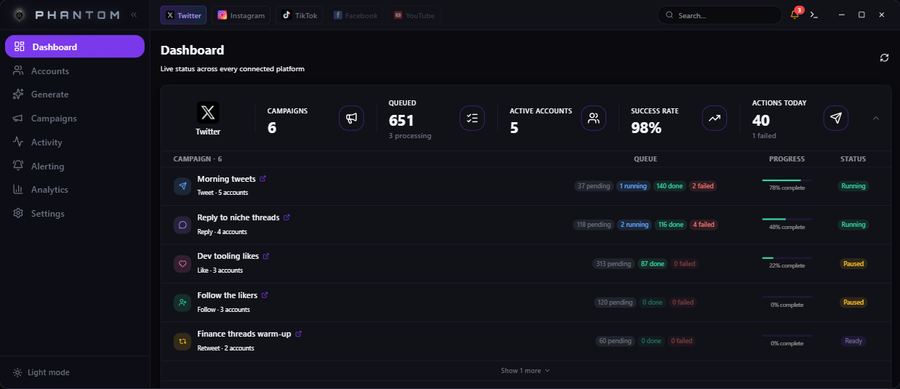
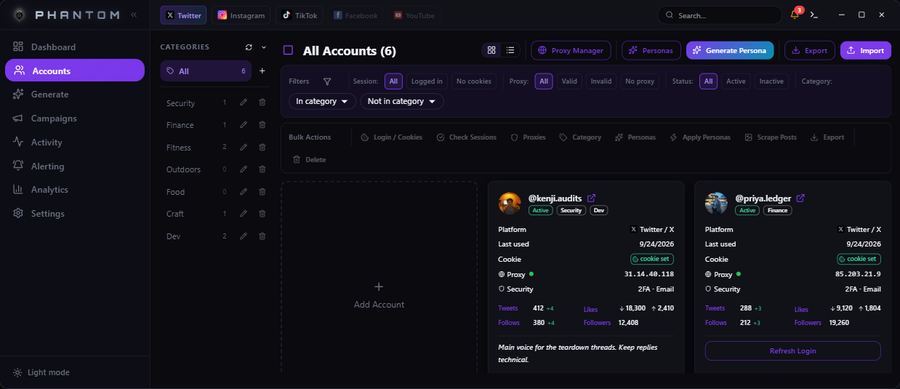
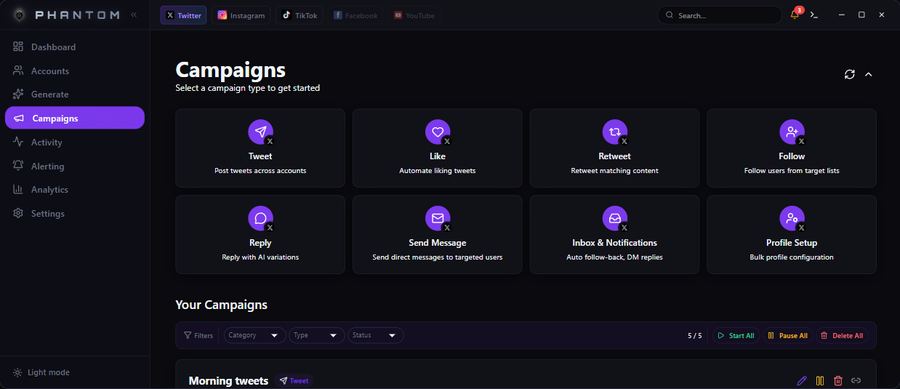
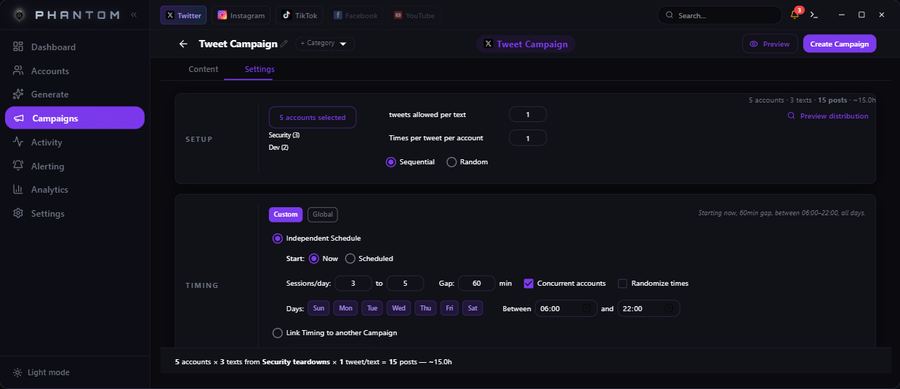
Open this page on a wider screen to click through it yourself.
Scale
More brands. Same attention.
Keep a client launch, a studio journal and a shop’s weekly update organised without losing track of whose account you’re working on.
Group authorised accounts by client, brand or campaign. Set schedules and daily limits for each one. Account capacity is room for real projects, never permission to operate account farms or manufacture engagement.
- Accounts grouped around your projects
- Schedules that fit each brand
- Separate browser sessions
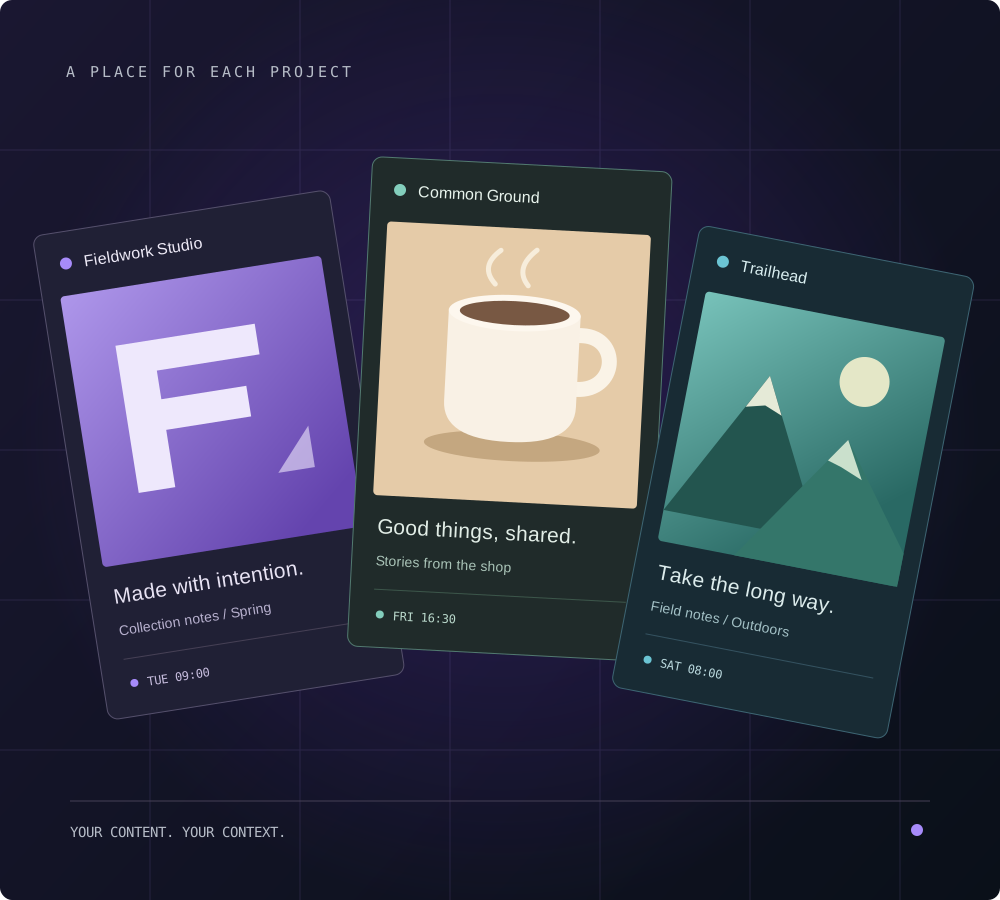
Browser profiles
A clear boundary between brands.
Each account has a separate browser profile with its own cookies and session. Optional customer-supplied proxies support your network setup; they must never be used to evade platform restrictions.
Move your cursor across the settings to explore two example brands. These are illustrative values, not a reading of your device.
Two brands. Separate contexts.Move your cursor across it
Fieldwork StudioCommon Ground
Pricing
Pay only for what you need
Every plan includes scheduling, browser profiles and automation tools. AI writing and personas start at Studio. Use is limited to authorised accounts and platform-permitted actions.
Pick your platforms. Your first two are on us. Add a third for $67 per year, or get every platform with Agency or Enterprise.
−20% yearly
Solo
For your own brand accounts.
$359.88 paying monthly
$287.90
per year · billed annually
You save $71.98 a year
10 accounts
- Scheduling and automation tools
- Separate browser profile per account
- Bring your own proxies
- Scheduling, limits and chaining
- Additional accounts: $5/month per 10
- Ticket support
Most popular
−20% yearlyStudio
For a growing client roster.
$659.88 paying monthly
$527.90
per year · billed annually
You save $131.98 a year
25 accounts
- Everything in Solo
- AI content from sources and content pools (your own keys)
- AI writing for posts, replies and DMs (your own keys)
- AI personas and brand voice settings
- Additional accounts: $3/month per 10
−20% yearly
Agency
For established agency workflows.
$1,259.88 paying monthly
$1,007.90
per year · billed annually
You save $251.98 a year
100 accounts
- Everything in Studio
- Every platform, no add-ons
- Direct support
- Personalized features
Built around you
Enterprise
For larger authorised portfolios.
Contact us
Let’s find the right fit
1000+ accounts
- Everything in Agency
- Custom account capacity
- A plan tailored to your team
Prices in USD. Checkout is currently paused. Final tax, renewal and cancellation terms will be shown before purchase.
Before you start
Good work. Clear boundaries.
Read our Terms of Service and Terms of Use (drafts for review).
What does Phantom do, and where does it run?
Phantom is a Windows desktop app for managing authorised X, Instagram, TikTok and YouTube accounts. It includes scheduling, content pools, separate browser profiles, and browser automation for posts, follows, likes, replies and messages. Features vary by platform. The preview uses sample data; it is not a live customer account.
Is every automation allowed by the platforms?
No. A feature being available does not mean a platform permits its use. You must check the rules for the specific action and account before enabling it. Platform-prohibited automation, bypassing restrictions and using proxies to evade enforcement are forbidden. Phantom is independent and is not endorsed by these platforms.
Can I use Phantom for account farms, spam or fake engagement?
No. We have zero tolerance for account farms, bought or fabricated identities, artificial engagement, unsolicited bulk messages, harassment and evading account restrictions. Manage only accounts you own or have explicit authority to operate. Report suspected abuse to support@phantomautomations.com.
What content is prohibited?
Adult sexual content, deceptive propaganda, coordinated manipulation, impersonation, hate, illegal material and copyright or privacy infringement are prohibited. Ordinary lawful opinions are not the same as deceptive influence operations. Our Terms of Use set out the rules and how suspected violations are reviewed.
How do AI, sources and proxies work?
AI writing, personas and media use your own provider keys on Studio and above. Check generated content before use and disclose synthetic material where required. Source imports need permitted access, and reuse needs ownership or permission. Optional customer-supplied proxies and separate browser sessions are not permission to bypass platform controls.
What happens if someone breaks the rules?
We may investigate reports, request information and restrict, suspend or terminate access for violations, subject to applicable law and the Terms of Service. Serious abuse can lead to immediate suspension. These are usage rules, not a claim that every action is automatically monitored or prevented.
Which plan fits my accounts?
Solo includes 10 accounts, Studio 25 and Agency 100. Enterprise offers 1000+ by agreement, for legitimate authorised portfolios. Every plan includes two platforms; Agency and Enterprise include every available platform. Monthly Solo and Studio plans offer extra blocks of 10 accounts at $5 and $3 respectively.
Can I buy a subscription today?
Checkout is currently paused while payment arrangements and commercial terms are finalised. Displayed prices are in USD; yearly prices cover a full year and show the saving against 12 monthly payments. Before sales open, checkout will explain taxes, renewal, cancellation and refund terms. Contact support@phantomautomations.com with questions.
Make space for the next idea.
Bring your brands, your voice and your editorial judgement. Keep the everyday work in one place.
Find your plan